
To close your bet365 account:
-
Select the Account Menu
from the top-right of your screen.
-
Choose Gaming Controls
-
Press Account Closure.
-
Select the Closure Period and the main reason for closure.
-
Click Continue to finalize the closure.
If you require assistance with your account closure, Contact Us.
Closure Period
When requesting to close your account online, you are required to choose one of the following closure periods:
-
One Week
-
One Month
-
3 Months
-
6 Months
-
12 Months
-
Indefinitely
If these durations do not meet your needs, you also have the option to enter a specific date.
Auto-Reopen
After closing your account online, your account automatically reopens once the selected time period has elapsed, unless the period you chose was Indefinitely.
Important Tip
If you contacted us to apply your account closure, you are required to Contact Us if you wish for it to be reopened, this cannot be done online.
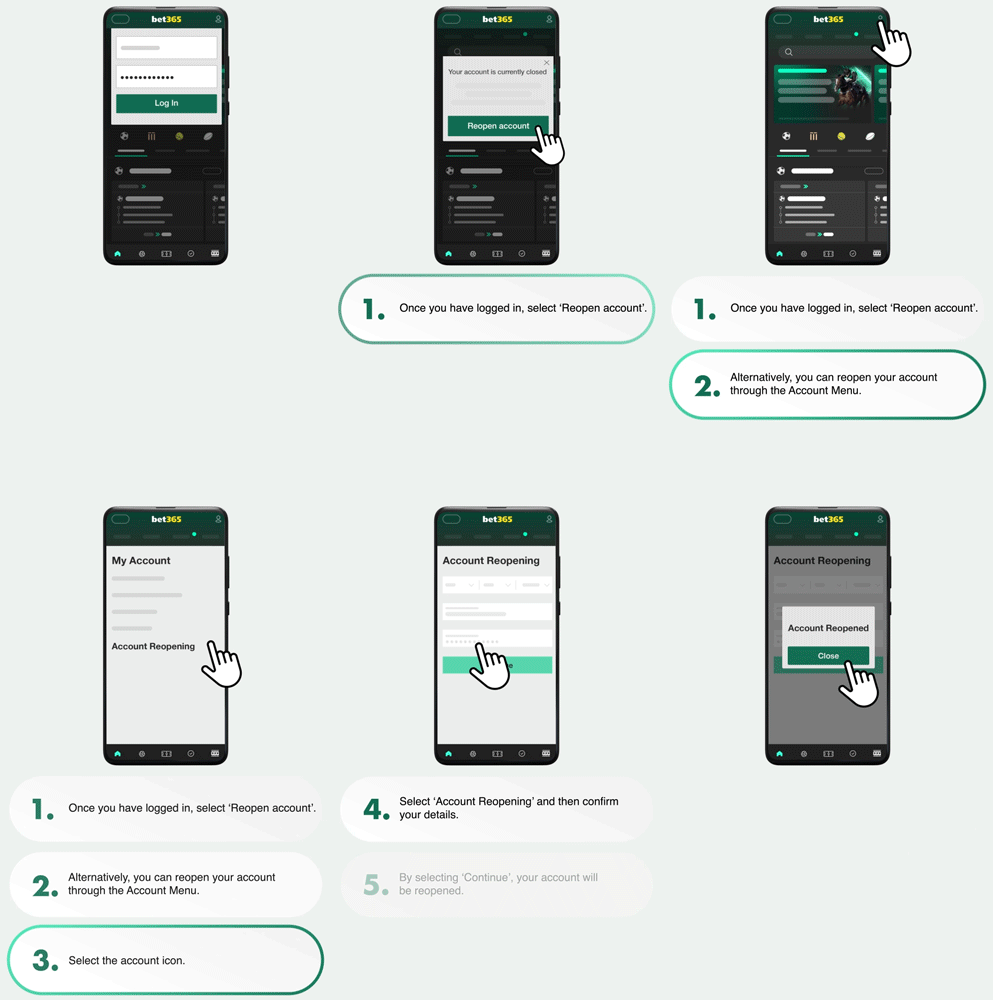
If you requested to close your account Indefinitely, or wish to reopen your account before the selected time period elapses, follow the steps below to reopen your account:
-
Once you have logged in, select Reopen Account, and follow the on-screen instructions.
Alternatively:
-
Select the Account Menu
-
Go to My Account.
-
Choose Account Reopening and fill in any additional security information that is required.
-
Press Continue and your account is reopened.
If you experience any issues when attempting to reopen your account online, Contact Us for further assistance.
Account Balance
You can still log in and withdraw any remaining balance you may have, after an online account closure.

